State Boundaries in Rust GUIs: egui vs. Slint
Comparing immediate mode vs. declarative reactive trees in Rust: paint costs, memory layouts, and why ad-hoc thread dispatch triggered 200 clones.
As Rust continues to be the platform of choice for quick and easy Windows and Linux development, I’ve stood up several Rust desktop applications this past year as I migrate tooling away from heavy C++ legacy apps and light (but fragile) PowerShell scripts.
Architecturally the apps couldn’t be more different.
- an internal data inspection tool built with egui, full of dense panels, diagnostic tables, and deep tree views.
- a monitor dock built with egui for various upstream token usage (it’s a rite of passage these days, right?).
- a power management and profiling tool built with egui with millisecond-based charting, rapid data storage, and deep Windows telemetry integration.
- an internal service-management daemon and dashboard built with Slint, featuring process lifecycles, live log streaming, remote telemetry, and confirm dialogs for high-risk system operations.
As you can see, most of my experience has been with egui as that had a natural transition from C++, but, so far, I like Slint too. The declarative syntax reads cleanly, the layout engine is predictable, and compile-time UI checking catches errors before runtime. However, state management in the dashboard began to feel surprisingly heavy. Changes that should have taken two lines of code required twenty lines of synchronization glue, and I found myself staring at roughly 200 .clone() calls scattered across the application.
I wanted to know whether that friction was an inherent tax of Slint’s architecture, or whether I had simply chosen the wrong concurrency pattern. After a lot of searching, reading blog posts, and combing through the documentation, the answer is split. Some of the trade-offs stem directly from the deep philosophical differences between immediate-mode and retained-reactive GUI models—specifically around paint costs and memory layout. But the clone explosion was entirely my own fault: I had used a clean Unidirectional Data Flow pattern in egui, and then abandoned it for ad-hoc point-to-point closures the moment I moved to Slint.
Lessons learned are good.
Immediate Mode vs. Retained Reactive Trees
To understand where state friction begins, you have to look at the rendering pipeline.
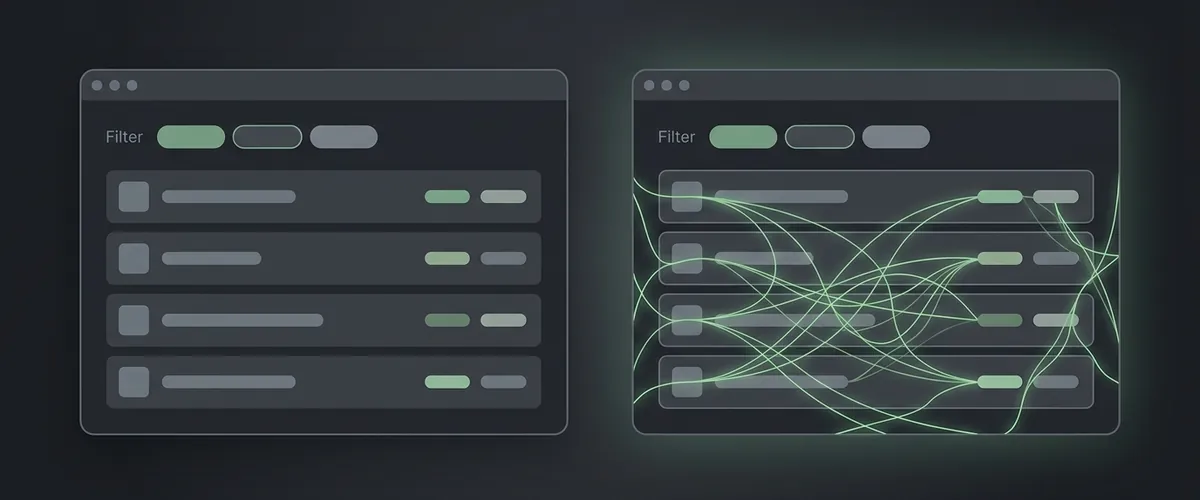
egui is pure immediate mode. There is no retained scene graph. Every single frame, egui re-executes your entire layout function. The UI does not store widget handles, state trees, or DOM-like hierarchies. It simply calls your Rust code, calculates geometry on the fly, and emits a list of textured triangles for the GPU to rasterize.
Slint, by contrast, is a retained reactive property graph. You declare the interface in Slint’s .slint markup DSL. The Slint compiler analyzes that markup ahead of time (AOT) and generates native Rust or C++ code for the component tree. When a property changes, Slint re-evaluates only the bindings that depend on it. State does not live directly in your procedural draw loops. It lives across a boundary in Slint’s reactive runtime.
The Layout and Paint Cost Trade-Off
The difference in rendering models dictates how layout is written and how much CPU your application consumes at idle.
Here is a simple header in Slint: a filter input box, an active service counter, and a horizontal container.
export component AppWindow inherits Window {
    preferred-width: 900px;

    HorizontalLayout {
        padding: 12px;
        spacing: 8px;
        LineEdit {
            placeholder-text: "Filter services";
            text <=> Dashboard.filter;
        }
        Text { text: Dashboard.running_count + " running"; }
    }
}
The markup reads top-to-bottom like the visual screen. Layout rules like flex spacing, padding, and alignment are handled declaratively by the compiler. Slint 1.18 added FlexboxLayout, bringing CSS-style multi-line wrapping to native UIs without manual coordinate math.
Crucially, Slint doesn’t re-execute your layout every frame. When a property changes, only the bindings that depend on it get marked dirty and re-evaluated, and the rest of the tree sits still. That dependency-driven model is why a mostly-static Slint dashboard costs almost nothing to keep on screen, which matters for battery life and embedded targets.
In egui, that same header is procedural Rust code:
fn ui(&mut self, ui: &mut egui::Ui, _frame: &mut eframe::Frame) {
    ui.horizontal(|ui| {
        ui.text_edit_singleline(&mut self.filter);
        ui.label(format!("{} running", self.running_count()));
    });
}
Layout in egui is expressed as nested closures and method calls. While it is easy to read for simple forms, complex responsive panels frequently require manual (and painful) sizing arithmetic in Rust.
More importantly, notice the line: format!("{} running", self.running_count()). In immediate mode, that string allocation and formatting code executes on every repaint. While repaints are driven by user input, that’s rare and cheap. But the moment the app requests continuous repaints (an animation, a spinner, a live chart ticking), it runs at the full frame rate, 60Hz or 144Hz, and ctx.request_repaint() is exactly how an app signs up for that.
For a diagnostic tool open for ten minutes on a desktop workstation, egui’s frame cost is negligible. For a background service daemon running 24/7 on a laptop, Slint’s dependency-driven repaint model is an enormous operational win.
The Memory and Data Boundary
Where egui wins decisively is in memory locality and data modeling.
In egui, your application state is an ordinary, idiomatic Rust struct. The UI loop holds &mut self. There is no FFI boundary, no type conversion, and no secondary representation:
struct ServiceDashboard {
    services: Vec<ServiceRow>,
    filter: String,
    confirm_stop: Option<u32>,
    events: std::sync::mpsc::Receiver<ServiceEvent>,
}

impl ServiceDashboard {
    fn drain_events(&mut self) {
        while let Ok(ev) = self.events.try_recv() {
            self.apply(ev);
        }
    }
}
Data stays in contiguous Rust heap memory. There is zero marshaling overhead. Sorting a table means calling standard .sort_by() on the Vec. Draining incoming worker events is a non-blocking try_recv() loop at the head of the frame.
In Slint, state lives on the other side of an architectural wall. The UI owns property nodes and export global singletons. Rust owns the business logic and communicates across generated bindings.
This separation is intentional. As Slint maintainers explained in GitHub Discussion #5114, Slint is inverted from Qt: you declare the interface in markup so that the live preview and UI designer work without compiling or executing backend business code.
The engineering cost of that design is state duplication and type marshaling:
- Strings cannot be plain
&strorString. They must be marshaled intoslint::SharedString, a copy-on-write string type where clones share the underlying data and a copy happens only on modification. - Collections cannot be simple slices. They must be wrapped in
slint::ModelRcorVecModel, and reading data back out of a model means callingrow_data(index)in a loop, crossing the abstraction layer on every lookup. - Globals are instantiated once per component, not once per process, so a secondary dialog declared as its own exported component gets its own instance of the global and can’t read the main window’s singleton.
- As noted in GitHub Discussion #9308, nested components cannot carry their own encapsulated Rust logic. Bindings and callbacks must be forwarded as properties through parent containers.
If you mirror your business state—keeping a Vec<ServiceRow> in Rust and duplicating it into a Slint ModelRc, you end up maintaining two separate sources of truth. In my dashboard, that meant ninety individual set_* calls and bidirectional mapping functions converting snapshots row by row.
Concurrency: Why the Clones Exploded
The real friction, however, came from background threading.
Because Slint’s UI runtime is single-threaded and owns the event loop, background threads (such as Tokio async tasks) cannot directly touch UI components. To update the screen from a background worker, Slint provides Weak::upgrade_in_event_loop:
let weak = ui.as_weak();
tokio::spawn(async move {
    let rows = client.fetch_rows().await?;
    weak.upgrade_in_event_loop(move |ui| apply_rows(&ui, rows)).ok();
    Ok::<_, anyhow::Error>(())
});
For one isolated worker, this pattern is clean. But in my service dashboard, background work wasn’t isolated. I had roughly ten asynchronous tasks handling metric scraping, health pings, process output streaming, and network probes.
Because each task needed to report status back, each task captured its own clone of Weak<AppWindow>. Furthermore, because tasks needed domain context, they also captured clones of four to six shared Arc<Mutex<State>> cache handles.
10 spawn sites × 5 clones = 50 clones right at the task boundaries. Add in the clones needed inside closures to bounce between async runtimes and Slint’s event loop thread, and the clone count quickly surpassed 200.
Here is the architectural irony: in egui, nothing hands a background thread a UI handle, so the mpsc::channel route (self.events.try_recv()) was the natural path. Background workers simply held an mpsc::Sender. They never knew the UI existed.
When moving to Slint, the convenience of Weak::upgrade_in_event_loop baited me into an anti-pattern. Instead of routing events through a central dispatcher, I allowed every asynchronous task to reach directly into the UI thread via ad-hoc closures.
The Architectural Antidote: Unidirectional Flow
The cure for Slint glue is not to abandon Slint. It is to bring channel discipline to Slint’s thread boundary.
Instead of handing Weak<AppWindow> to ten background tasks:
- Workers emit domain actions: Background tasks hold only a clone of
tokio::sync::mpsc::Sender<AppAction>. They never touch UI types, weak pointers, or view models. - A single coordinator owns business state: A dedicated state coordinator task listens to the channel, updates domain structs in plain Rust memory, and computes minimal view payloads.
- A single dispatcher updates the UI: Only one loop holds
Weak<AppWindow>. It receives consolidated view updates from the coordinator and applies them in batch throughupgrade_in_event_loop.
For minor callbacks where a quick event-loop hop is necessary, wrap the upgrade call in a concise helper:
fn ui_post<F>(weak: &slint::Weak<AppWindow>, f: F)
where
    F: FnOnce(AppWindow) + Send + 'static,
{
    let _ = weak.upgrade_in_event_loop(f);
}
Weak::upgrade_in_event_loop queues the closure for the next iteration of the main thread’s event loop. If the component is gone by then (for example, the user closed the window), the closure is quietly dropped. Never place essential cleanup or database commits inside a UI upgrade closure.Where Slint’s Declarative Model Shines: Modals and State Boundaries
While data marshaling requires discipline, Slint’s separation of concerns pays huge dividends in UI validation.
Consider modal confirm dialogs. In my service dashboard, stopping a production service requires confirmation:
if Dashboard.pending_stop >= 0: Rectangle {
    background: #000000cc;
    TouchArea {}  // block click-through to underlying dashboard

    Rectangle {
        width: 440px;
        height: 180px;
        background: #1f2937;
        border-radius: 8px;

        VerticalLayout {
            padding: 16px;
            spacing: 12px;
            Text { text: "Are you sure you want to stop this service?"; font-size: 14px; }
            HorizontalLayout {
                alignment: end;
                spacing: 8px;
                Button {
                    text: "Stop Service";
                    clicked => {
                        Dashboard.stop_service(Dashboard.pending_stop);
                        Dashboard.pending_stop = -1;
                    }
                }
                Button {
                    text: "Cancel";
                    clicked => { Dashboard.pending_stop = -1; }
                }
            }
        }
    }
}
In Slint, the entire confirmation lifecycle is encapsulated directly in the presentation tree. The TouchArea intercepts clicks, the overlay dims the background, and Rust never hears about the action until the user actually clicks “Stop Service.” The backend domain layer is completely insulated from intermediate UI states.
In egui, that modal must be tracked in the main Rust struct (confirm_stop: Option<u32>) and rendered imperatively using egui::Window::new("Confirm"). While this makes the confirmation logic easier to unit-test in pure Rust, it clutters the domain state with transient presentation flags.
Licensing Considerations for Production Rust Apps
Licensing is another practical factor when choosing between the two frameworks.
egui is open source under a dual MIT/Apache-2.0 license. Commercial use is fine, with the usual license-notice retention both licenses require.
Slint uses a multi-tier model. For open-source projects, Slint is licensed under GPLv3. For proprietary desktop and mobile applications, Slint offers a generous Royalty-Free tier. The key condition is attribution: per the Slint FAQ, your application must display an AboutSlint widget in an accessible About window, or include the Slint attribution badge on your public download page.
If your organization requires a proprietary license without attribution or is targeting embedded hardware, Slint offers commercial seat licenses. The Startup & Individual tier covers businesses with up to 10 employees, up to €2M in turnover, and less than five years since incorporation, with current per-seat pricing on the Slint pricing page.
Making the Architectural Choice
If you are deciding between egui and Slint for a Rust desktop project, the decision comes down to your primary constraint:
- Reach for egui when building developer tools, internal diagnostic dashboards, or game engines where UI density is high, visual styling is secondary, and you want your UI to mutate plain Rust structs without FFI layers or data marshaling. Just be mindful of frame-by-frame allocation costs and CPU usage on battery power.
- Reach for Slint when building consumer-facing products, embedded interfaces, or long-running daemons where visual polish, declarative layout, and low idle CPU cost matter.
If you choose Slint, design the state boundary on day one. Do not let async tasks reach directly into the UI thread with ad-hoc closures and weak handles. Treat your Slint UI as an isolated display boundary: communicate across channels, compute view models in a single coordinator, and let the declarative compiler do what it was designed to do.
(Note: Code snippets above are illustrative pseudo-code representing API shapes rather than complete compilable projects. Traits and methods reflect egui 0.28+ and Slint 1.18+).
If you are exploring systems migrations from shell scripts to native code, my earlier post on moving a PowerShell script to a Rust app covers that transition from the ground up.